Diffly
Diffly is a lightweight two-pane text comparison and editing application built with Rust and Slint.
README
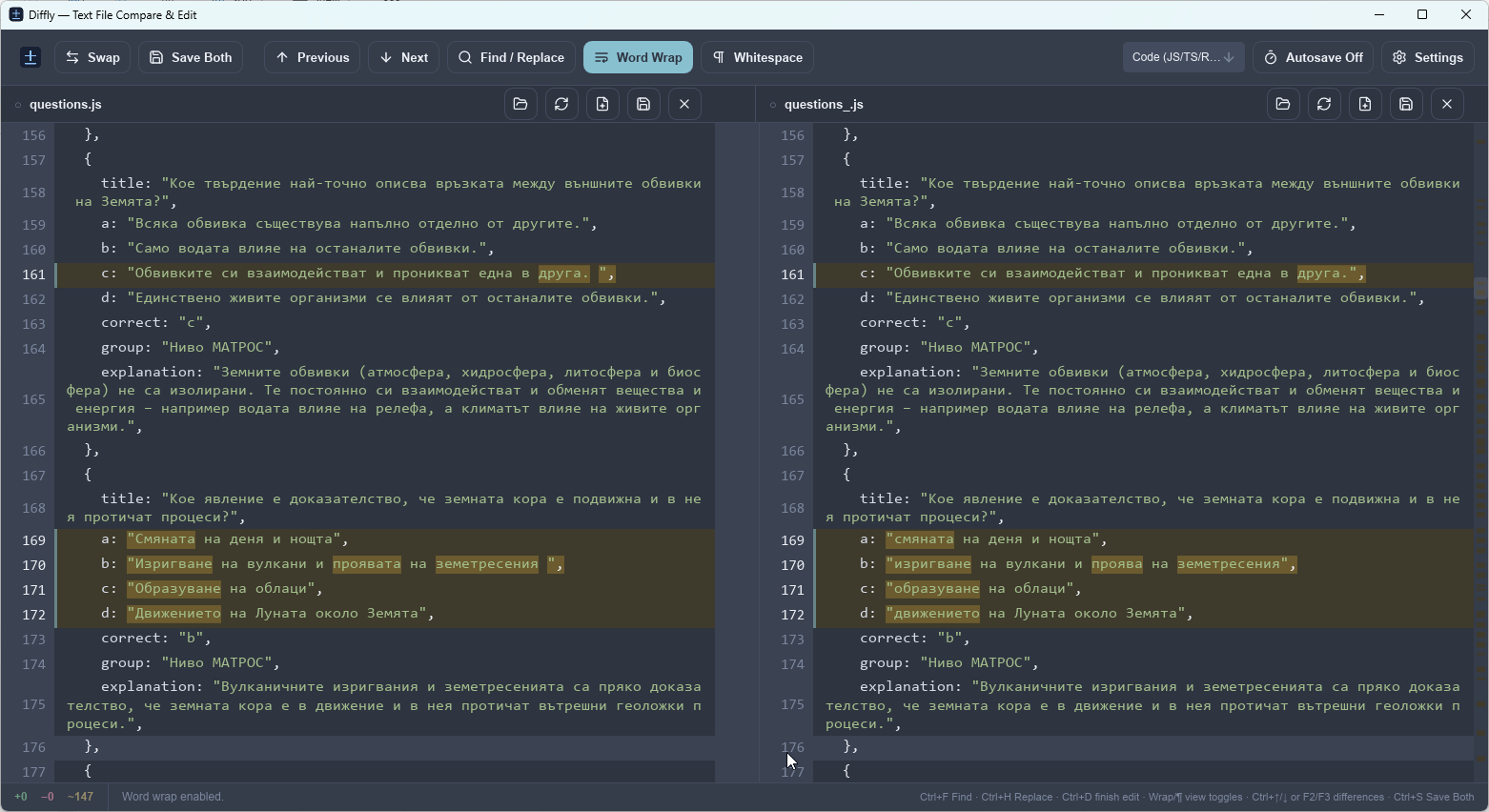
Diffly is a fast, lightweight two-pane text comparison and editing tool built with Rust and Slint. It is designed for reviewing structured text files side by side, spotting changes quickly, and making small edits without leaving the diff view.
Features
- Side-by-side file comparison with aligned lines in the left and right panes.
- Line and inline diff highlighting for added, removed, and modified content.
- Syntax highlighting for JSON, JavaScript/TypeScript/Rust/C-style code, CSV/TSV, YAML/TOML/INI, XML/HTML, and plain text.
- Inline editing: click a line to edit it directly in the comparison view.
- Per-pane file actions: Open, Reload, New, Save, and Close for each side.
- Save Both command for saving both open files at once.
- Unsaved-change protection with Save / Don’t Save / Cancel prompts before replacing, reloading, closing, or exiting with modified files.
- Find / Replace with Previous/Next Match, Replace, Replace All, Mark All, case-sensitive matching, and pane scope selection.
- Word Wrap for long lines.
- Whitespace visualization for spaces and tabs.
- Previous / Next Difference navigation from the toolbar or keyboard.
- Copy changed lines between panes using the directional controls that appear between matching rows.
- Autosave, disabled by default and configurable from Settings.
- Difference minimap for quick navigation through large files.
- Customizable appearance with dark and light themes, font controls, tab width, colors, dropdown/input colors, and a color picker.
- Persistent settings between application launches.
- Windows application icon embedded in the executable when the Windows resource compiler is available.
Screenshots
Supported syntax modes
Diffly can automatically choose a syntax mode from the file extension, or you can select one manually from the toolbar.
| Mode | Common extensions |
|---|---|
| JSON | .json, .jsonc, .json5, .geojson, .webmanifest |
| Code | .js, .ts, .jsx, .tsx, .rs, .c, .cpp, .cs, .java, .go, .kt, .swift, .php, .css, .scss, .dart |
| CSV / TSV | .csv, .tsv |
| YAML / TOML / INI | .yaml, .yml, .toml, .ini, .cfg, .conf, .env, .properties |
| XML / HTML | .xml, .html, .htm, .svg, .xhtml, .xaml, .plist |
| Plain Text | Any other text file |
Keyboard shortcuts
| Shortcut | Action |
|---|---|
| Click a line | Edit that line |
Enter |
Commit the current line edit |
Esc |
Cancel the current line edit |
Ctrl+D |
Finish the current line edit |
Ctrl+S |
Save both files |
Ctrl+O |
Open a file in the left pane |
Ctrl+F |
Open Find |
Ctrl+H |
Open Find / Replace |
Ctrl+Down or F3 |
Next difference |
Ctrl+Up or F2 |
Previous difference |
Download and run
For a GitHub Release, download the Windows ZIP, extract it, and run:
Diffly.exeDiffly is a desktop application and does not require an installer in the current release.
Build from source
Requirements
- A recent stable Rust toolchain
- Cargo
- On Windows, the MSVC Rust toolchain is recommended
- Windows SDK /
rc.exeis recommended so the application icon can be embedded in the executable
Clone the repository and build the optimized executable:
cargo build --release --lockedThe executable will be created at:
target/release/diffly.exeTo build and run in one command:
cargo run --release --lockedYou can also pass two files on the command line:
cargo run --release --locked -- old.json new.jsonWindows release package
The repository includes build-release.bat. Run it from the project root:
build-release.batThe script performs a locked optimized build and creates a GitHub-ready package under dist/, for example:
dist/Diffly-v0.1.0-windows-x64.zipSettings
Diffly stores its configuration in the platform-specific application data directory:
- Windows:
%APPDATA%\diffly\config.json - Linux:
~/.config/diffly/config.json - macOS:
~/Library/Application Support/diffly/config.json
The configuration is JSON and can also be edited manually while Diffly is closed.
Included themes
- Obsidian
- Mist
- Nordic
- Terminal
- Paper
- Snow
- GitHub Light
- Solarized Light
- Sepia
Project structure
src/
  main.rs       Application state, file operations, autosave, and UI callbacks
  diff.rs       Line alignment and inline difference calculation
  syntax.rs     Syntax tokenization and highlighting
  config.rs     Themes, colors, and persistent settings
ui/
  app.slint     Main Slint user interface
  icons/        Lucide icons and application icon assets
build.rs        Slint compilation and Windows executable resources
Notes and current limitations
- Editing is intentionally line-oriented rather than a full multi-line source-code editor.
- There is currently no Undo / Redo history.
- Very large files can take longer to open because diffing and syntax highlighting are calculated for the full document.
- Autosave is off by default. If you enable it, keep important files under version control or another backup system.
Third-party assets
Toolbar icons are based on Lucide. The corresponding license notice is included in ui/icons/LUCIDE_LICENSE.txt.
Contributing
Bug reports and focused pull requests are welcome. When reporting a rendering or scrolling issue, please include:
- operating system,
- Rust version (
rustc --version), - the full compiler/runtime output when relevant,
- whether Word Wrap or Whitespace visualization is enabled,
- and a small sample file when the issue depends on specific text content.